mrkr vs Microsoft Clarity.
Clarity is free, unlimited, and good. It also needs a consent banner, tells you nothing about where your traffic came from, and makes Microsoft the controller of your visitors' data. Here is the honest trade.
In short
Should I use Microsoft Clarity or mrkr?
Use Clarity if your budget is zero and you want unlimited session replay and heatmaps. Use mrkr if you need analytics rather than only behaviour, want to skip the consent banner, or cannot hand your visitors' data to Microsoft. Clarity wins on price. mrkr wins on consent, attribution, and ownership.
This is not a close feature comparison dressed up as a hard choice. Clarity is a strong free product and pretending otherwise would waste your time. The question is whether the three things it costs you are things you care about.
The question Clarity cannot answer.
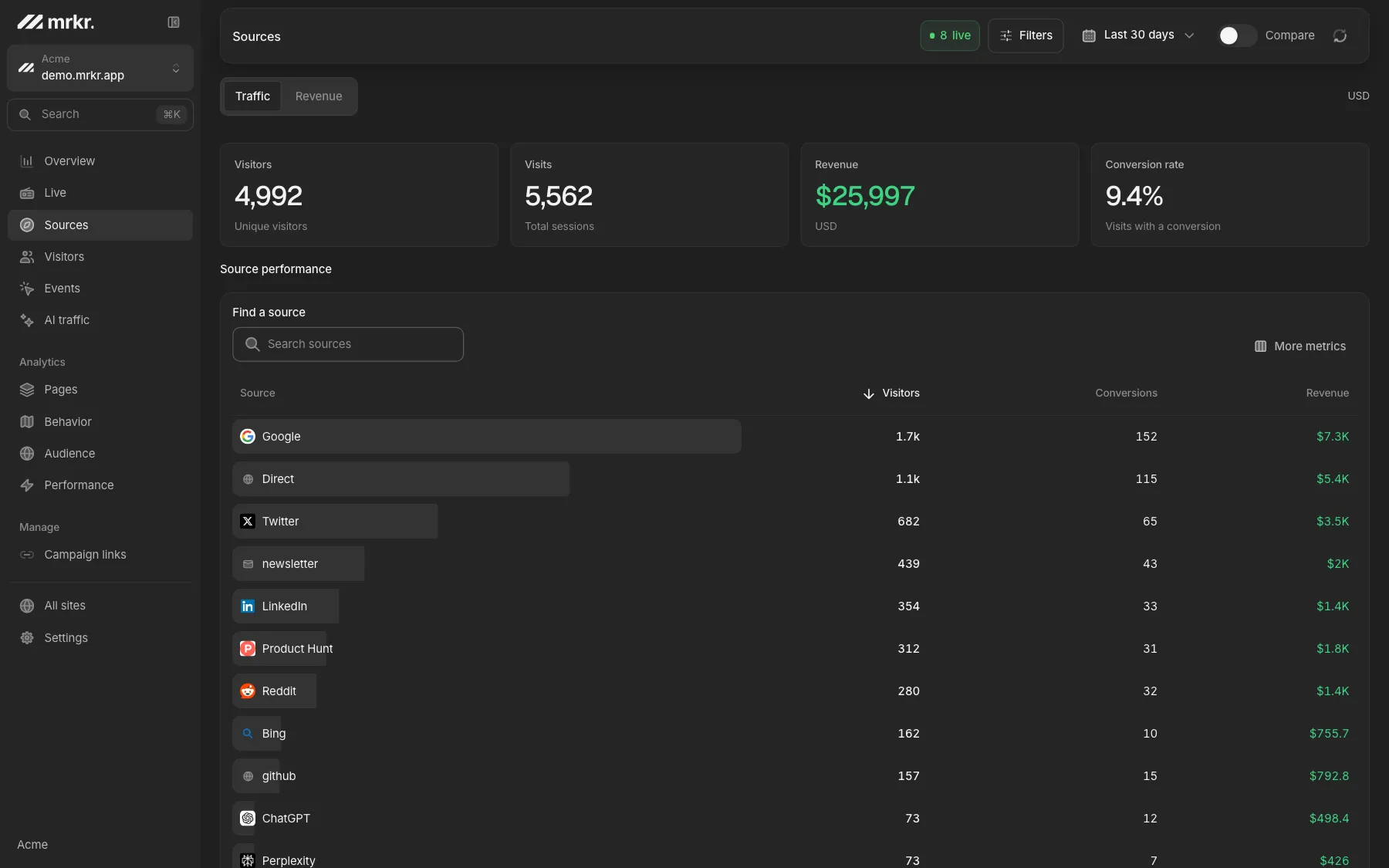
Clarity shows you what a visitor did. It has no traffic sources, no referrers, and no UTM campaign reporting, so it cannot tell you which channel produced the person you just watched.
What free actually costs.
The consent tax
Clarity needs a banner, and the people who decline are not a random sample of your traffic.
No answer to where they came from
No campaign, referrer, or landing page, so behaviour never connects to spend.
Microsoft is the controller
Interaction data sits on Microsoft's infrastructure under Microsoft's terms.
Not the system of record
Nobody reports monthly numbers out of Clarity, so it runs beside a second tool.
Compared
Side by side.
| Feature | mrkr | Microsoft Clarity |
|---|---|---|
| Price | $5/mo, 100K pageviews, session replay included | Free, no paid tier |
| Session replay | On every plan | Unlimited |
| Heatmaps | No | Yes |
| Cookieless by default | Optional cookie mode | No |
| Consent banner required | No in cookieless mode, yes in cookie mode | Yes |
| Traffic sources and referrers | Yes | No |
| UTM campaign tracking | Yes | No |
| Funnels | Yes | Basic |
| Revenue attribution | Yes | No |
| Realtime dashboard | Yes | No |
| Data controller | You | Microsoft |
| Data export | On request, not self-serve | Limited |
Clarity details checked against clarity.microsoft.com and its terms on 2026-08-24.
Live demo
Compare it against something real. The live demo is a fully populated dashboard: sources, funnels, revenue, and recordings on the same dataset. Open it and judge the gap yourself.
Open the live demoWhen Clarity is the right answer. Solo founder, no budget, no EU traffic, no procurement process? Clarity is an excellent tool and you should use it.
Unlimited replay for nothing
There is no session cap and no bill. That is a real offer, not a trial.
Heatmaps mrkr does not have
Click and scroll maps are included. mrkr ships no heatmaps at any tier.
Nothing to evaluate
No plan to pick and no procurement call. It is running in ten minutes.
FAQ
Is Microsoft Clarity really free?
Yes. Clarity has no paid tier, no session cap, and no sampling limit that you pay to remove. It is a genuinely free product, which is why it is the hardest competitor in this category to argue against on price.
Why would I pay for mrkr when Clarity is free?
Three reasons, and none of them is features-per-dollar. Clarity sets cookies, so you need a consent banner and you lose the visitors who decline. Clarity is a behaviour tool with no traffic sources, campaigns, or revenue attribution. And with Clarity, Microsoft is the data controller for your visitors' data.
Does Clarity need a cookie banner?
Yes. Clarity sets first-party cookies to identify sessions and returning users, which requires consent in the EU, UK, and California. mrkr's default cookieless mode writes nothing persistent to the visitor's device.
Who controls the data in each case?
With Clarity, Microsoft processes and stores your visitors' data on its own infrastructure under its own terms, and uses it in ways its terms permit. With mrkr, you are the controller, the data is yours, and you can export or delete it at any time.
Can I use both?
Yes. Clarity for unlimited exploratory replay and heatmaps, mrkr as the cookieless-by-default analytics layer that still counts the visitors who decline consent, is a defensible setup. You will be running two scripts and two consent postures.
Start with one line of HTML.Your first visitors show up within a minute.