Find the step that loses people, then watch it happen.
A funnel tells you 38% leave at payment. It cannot tell you the card field rejects a space in the number. mrkr puts the sessions that dropped one click from the bar that shows the drop.
In short
What is funnel analysis?
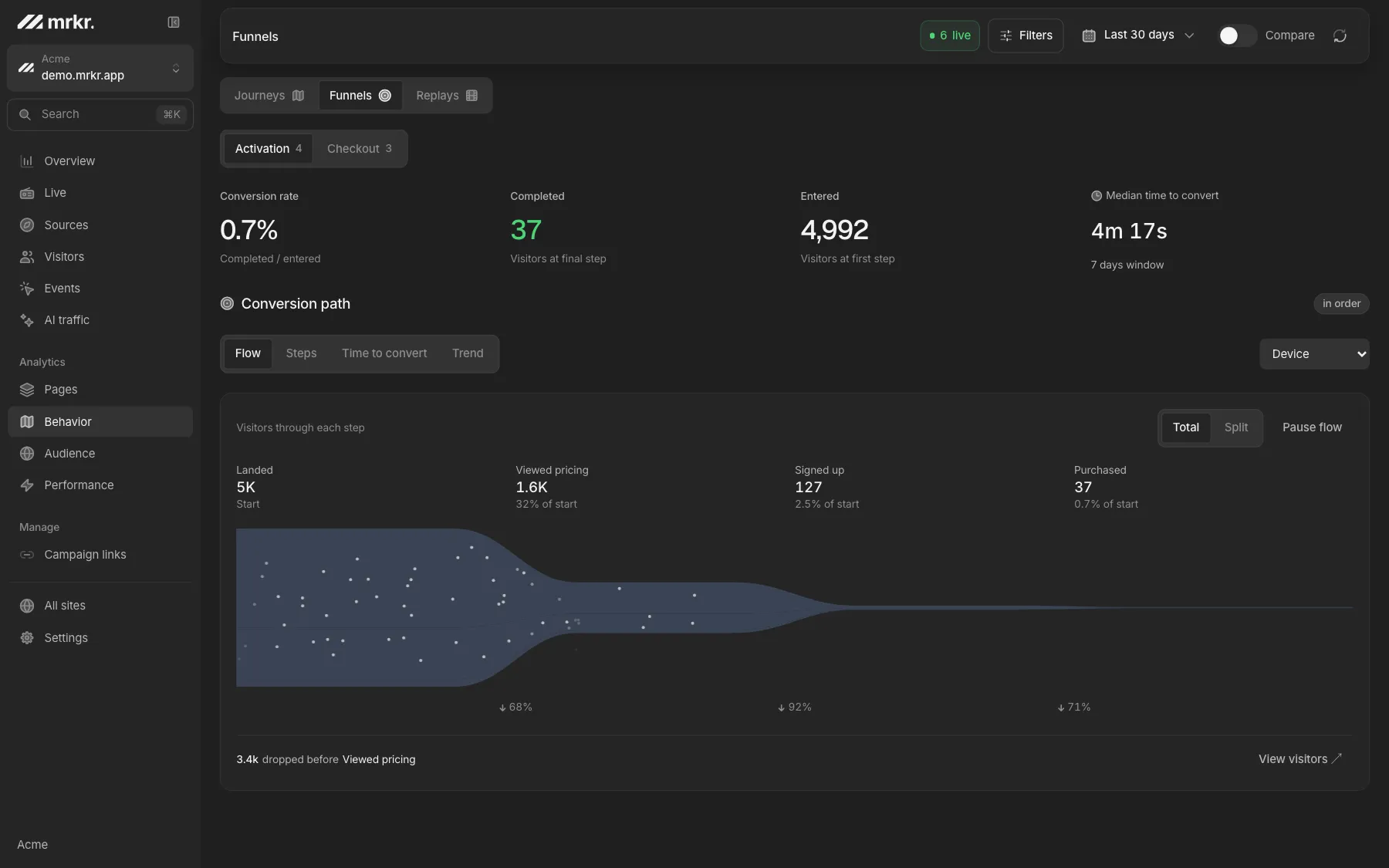
Funnel analysis measures how many visitors completed an ordered sequence of steps and where the rest dropped off. It turns a single conversion rate into a per-step diagnosis, so instead of knowing that signup underperforms you know which of its four screens loses two thirds of the people who reach it.
The chart is the easy half. The half that decides whether the analysis was worth doing is what you can reach from the bar: the specific people who stalled, and what their sessions looked like.
If you have the two numbers already and just want the arithmetic, the free conversion rate calculator works out a rate, and a lift between two of them, in the browser. A funnel is what tells you which step produced the number.
Every number from one walk.
Steps, time to convert and trend are three views on the same computation, not three separate queries. Steps shows visitors reaching each stage with drop-off counts and conversion rate both from the previous step and from the top. Time to convert is a histogram of how long converters took, with median and 90th percentile. Trend plots entrants and converters per day.
Trend buckets by the day a visitor entered the funnel rather than the day they converted, so a given day’s conversion rate stays attached to the traffic that produced it instead of drifting forward.
Compared
The three order modes. Most tools offer these and few explain what they actually enforce. Here is exactly what each one does in mrkr.
| Mode | What it enforces | Use it when |
|---|---|---|
| In order | Steps must happen in sequence. Unrelated events in between are fine. | The default. Almost every real funnel. |
| Strictly in order | No other step in this funnel may fire between two consecutive steps. | You want to catch people jumping back or skipping ahead. |
| Any order | Counts visitors who completed the steps in any sequence. Step N means completed at least N of them. | Onboarding checklists and other genuinely unordered sets. |
Some tools define strict order as disqualifying anyone who did anything else in between. mrkr does not, and the reason is stated rather than hidden: every pageview is mirrored into events, so that definition would disqualify nearly every real session on any funnel containing a pageview step.
How it works
Building one, in four moves.
- 1
Pick the steps
A step is a path or a named event. Match it with is, contains, starts with, or a regular expression. Two steps is the minimum before anything computes.
- 2
Set the window
14 days by default, settable in minutes through weeks. In cookieless mode keep it inside a day, because the visitor id rotates at 24 hours.
- 3
Add exclusions if you need them
An exclusion removes a visitor from the funnel entirely if it fires between two named steps, rather than just halting their progress.
- 4
Break it down
Split by a session dimension or an event property. Each visitor lands in one group, so the grouped bars always sum to the totals.
Click the drop, get the recording.
This is the loop that makes funnels useful rather than decorative. Click a step that lost people and mrkr opens a sample of up to a hundred visitors who stalled there, each with enough session context to spot a pattern: source, device, country, entry page.
Where a session was recorded, there is a link straight into the replay player. You go from a percentage, to the people behind it, to watching one of them give up, without leaving the product or switching tools.
Live demo
Open a real funnel. The live demo has a populated multi-step funnel with breakdowns, time to convert, and drop-off inspection. No signup, no card.
Open the live demoFunnels people get wrong.
Too many steps
Nine steps means eight places to lose people and no obvious first fix. Start with three or four real decisions.
A window that outlives the identifier
A 14-day window on a cookieless site cannot follow anyone past midnight. Shorten it, or switch that site to cookie mode.
Breaking down after the fact
A funnel that looks fine is often two funnels: mobile at 4% and desktop at 19%. Split by device before concluding anything.
Treating drop-off as failure
Some drop-off is qualification working. The question is whether the people leaving are the ones you wanted.
FAQ
Do funnel steps cost extra?
No. mrkr bills on pageviews and nothing else, so the custom events your funnel steps are built from are free. Instrumenting a five-step funnel costs the same as instrumenting none, which is deliberate: nobody should be pricing out their own measurement.
What is funnel analysis?
Measuring how many people completed an ordered sequence of steps and where the rest dropped off. It converts a single conversion rate into a per-step diagnosis, which is the difference between knowing a page is underperforming and knowing which field on it is rejecting people.
How do I build a funnel in mrkr?
Add at least two steps. Each step is either a pageview matching a path or a named event, matched with is, contains, starts with, or a regular expression. Set a conversion window, pick an order mode, and the funnel computes from a single walk over each visitor's events.
What is a conversion window?
How long a visitor has, from their first qualifying event, to complete the remaining steps. mrkr defaults to 14 days and lets you set it in minutes, hours, days or weeks. The window opens at the visitor's first matching event rather than their best-fitting one, so entrants is a stable count of people rather than of attempts.
Can I see why people dropped off?
Yes, and this is the part most tools stop short of. Clicking a step that lost visitors opens a sample of up to 100 people who stalled there, with their source, device, country and entry page, and a link into the session recording where one exists.
Does funnel analysis need cookies?
Not in mrkr's default cookieless mode, as long as your conversion window fits inside a day. The visitor identifier rotates every 24 hours, so a 14-day window cannot follow someone across days unless the site is in cookie mode, and that requires a consent banner.
What does strictly in order mean in mrkr?
That no other step in the same funnel fired between two consecutive steps. It deliberately does not mean no other event at all, because every pageview is mirrored into events, so the stricter reading would disqualify almost every real session on any funnel containing a pageview step.
Start with one line of HTML.Your first visitors show up within a minute.