Judge a channel on what it earned.
One call at checkout, and every source, campaign and landing page in your dashboard carries a money column next to its visitor count. Cookieless by default, so no consent banner is required for it.
In short
What is revenue attribution?
Revenue attribution connects money to the traffic that produced it, so each source and campaign is measured by what it earned rather than by how many visits it sent. It is the difference between a channel that looks cheap per click and a channel that is actually cheap per customer.
Almost every privacy-first analytics tool stops at the visit. That is the single most common reason teams keep Google Analytics installed next to the tool they prefer, and it is the gap this closes.
How it works
One call, and the rest is already there.
- 1
The visit is classified on arrival
Referrer, source, medium and any UTM parameters are attached to the session before the visitor has clicked anything.
- 2
Report the purchase
Call mrkr.revenue(49.00, { plan: "pro" }) when the sale completes. The amount is the first argument; anything after it is optional properties.
- 3
mrkr attributes it
The amount is recorded against the visit, and the visit already knows where it came from. Revenue by source falls out of that without any configuration.
- 4
Read it four ways
Total revenue, a daily series, a breakdown by source, and average revenue per visitor. The overview page carries the headline figure alongside your traffic.
Money next to the traffic that made it.
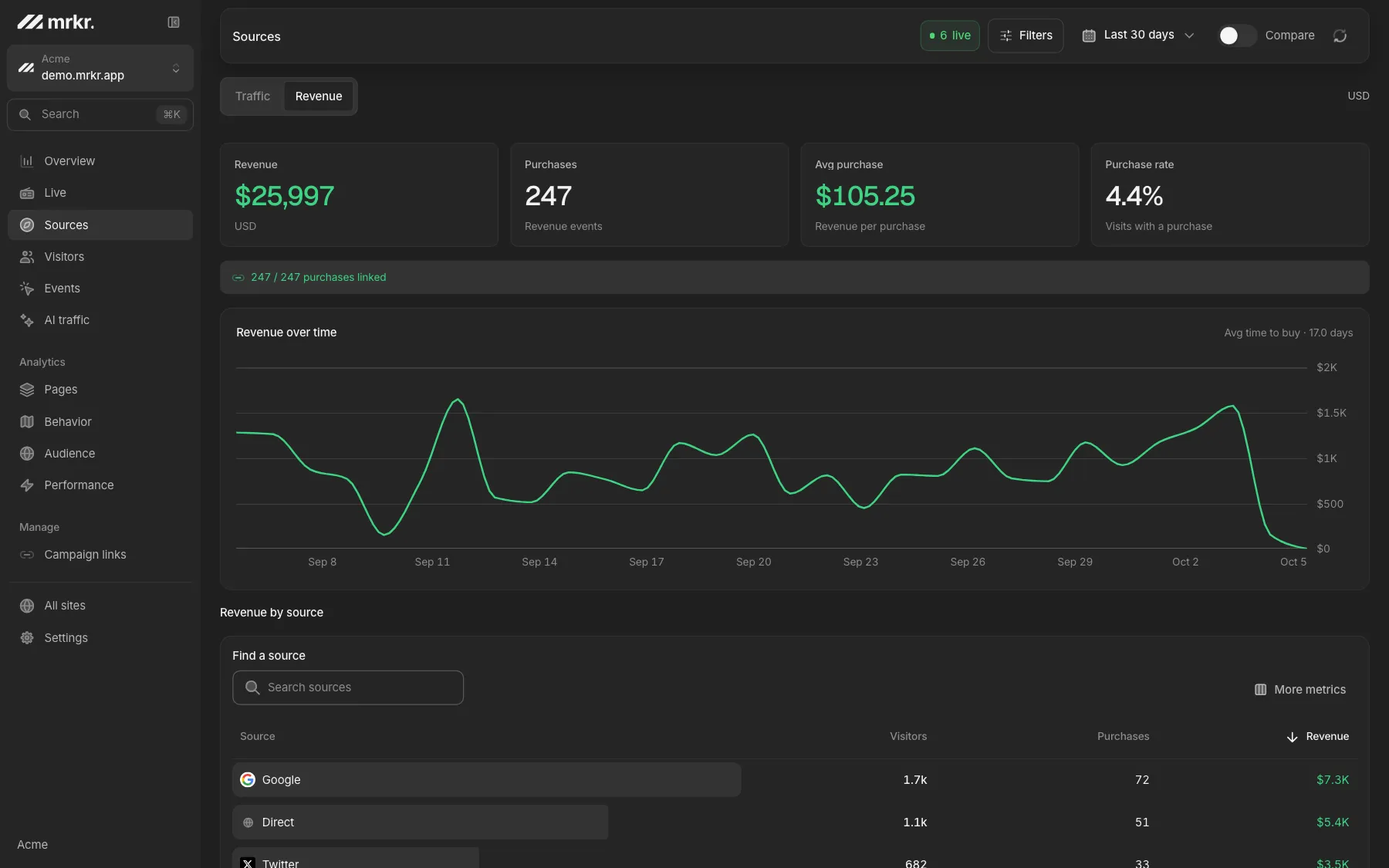
The revenue view shows the total for the range, the daily trend, average revenue per visitor, and which sources produced the money. Every filter that works elsewhere works here, so you can put one campaign, one country or one recorded event behind the number.
A revenue event also counts as a purchase conversion alongside your other goals, so a checkout appears both as money and as a conversion without you instrumenting it twice.
What it changes in practice.
The cheap channel stops looking cheap
Four times the visitors at a tenth of the revenue per visitor is not a bargain, and a visitor count cannot show it.
Campaigns get judged on the right axis
Two campaigns with identical click-through can differ tenfold in what they earn. The breakdown carries revenue.
Conversion journeys become visible
Inspect a buyer’s source, sessions and elapsed time from the first retained visit to a purchase.
A funnel gets a better denominator
Conversion rate says how many finished. Revenue per entrant says whether finishing was worth anything.
Compared
Who else ties traffic to revenue. The privacy-analytics field is thin here, which is exactly why the question keeps coming up in evaluations.
| Feature | mrkr | Plausible | Fathom | Simple Analytics | Hotjar |
|---|---|---|---|---|---|
| Revenue attribution | Per source and campaign | Goal revenue only | No | No | No |
| Cookieless by default | Optional cookie mode | Yes | Yes | Yes | No |
| Session replay | Yes | No | No | No | Yes |
| Funnels | Yes | Yes | No | No | Only on higher tiers |
| Entry price | See pricing | $9/mo | $15/mo | EUR 20/mo | $32/mo |
Competitor details checked against their own pricing and feature pages on 2026-08-24. "Goal revenue only" means revenue can be attached to a goal but is not broken out as its own attribution surface.
Live demo
Open the revenue view. The live demo has revenue, average revenue per visitor and per-source attribution on real demo traffic. No signup, no card.
Open the live demoWhat this does not do.
Last click within the session
No multi-touch model, no time decay, no position-based split. The visit that converted gets the credit.
A one-day window, cookielessly
A purchase today cannot be credited to yesterday's click unless the site runs cookie mode, which needs consent.
Stripe, or the page
Stripe payments arrive by signed webhook. Other processors report revenue with a purchase event from the page.
No currency conversion
mrkr sums the raw numbers you send. Normalise first and send one unit. A zero amount still counts as a purchase conversion.
FAQ
Does reporting revenue cost extra?
No. mrkr bills on pageviews and nothing else, so revenue events and the purchase conversions they create are free. You are billed for the traffic you get, not for telling mrkr what a visit was worth.
What is revenue attribution?
Connecting money to the traffic that produced it, so a channel is judged on what it earned rather than on how many people it sent. Without it you optimise for visits, and the cheapest visits are almost never the most valuable ones.
How do I track revenue in mrkr?
Call mrkr.revenue(amount, props) at the moment a purchase completes, usually on your confirmation page or after a successful checkout. mrkr records the amount against that visit, and the visit already carries its classified source and campaign.
What currency does mrkr use?
Whatever unit you send. mrkr does not convert currency and does not assume cents against whole units, so send one consistent unit every time. If you sell in several currencies, normalise to a single reporting currency before you call revenue().
Does revenue attribution need cookies?
Not for purchases that complete during the visit, which is most checkout flows. In the default cookieless mode the visitor identifier rotates every 24 hours, so revenue cannot be credited to a campaign clicked on an earlier day. Cookie mode extends that window and requires a consent banner for that site.
Can mrkr receive revenue from a Stripe webhook?
Yes. Connect Stripe in Settings, Stripe payments: add your site's webhook URL to Stripe and save its signing secret in mrkr. Paid charges and Checkout Sessions are then recorded from the signed webhook and credited to the visit that started them. mrkr never trusts a browser-provided amount.
Which attribution model does mrkr use?
Effectively last click within the session. The revenue event is attributed to the source and campaign classified for that visit. There is no multi-touch model, no time decay, and no position-based split, and mrkr will not pretend a modelled number is a measured one.
Start with one line of HTML.Your first visitors show up within a minute.