Visitor tracking that tracks behaviour, not people.
See every visit as a journey: where it came from, what it touched, how far it read, and whether it converted. Identities rotate daily by default, so there is nothing following anyone around.
In short
What is website visitor tracking?
Website visitor tracking records what individual visits do on your site: the pages seen and in what order, the source that brought them, the clicks and events along the way, and whether they converted. It is behaviour at the level of a visit, rather than site-wide totals like monthly pageviews.
The word “visitor” is doing a lot of work in that sentence, and different tools mean very different things by it. Some mean a browser they can follow for a year. Some mean a company they inferred from an IP address. mrkr means one person’s activity, identified well enough to be readable as a story and not well enough to follow them tomorrow.
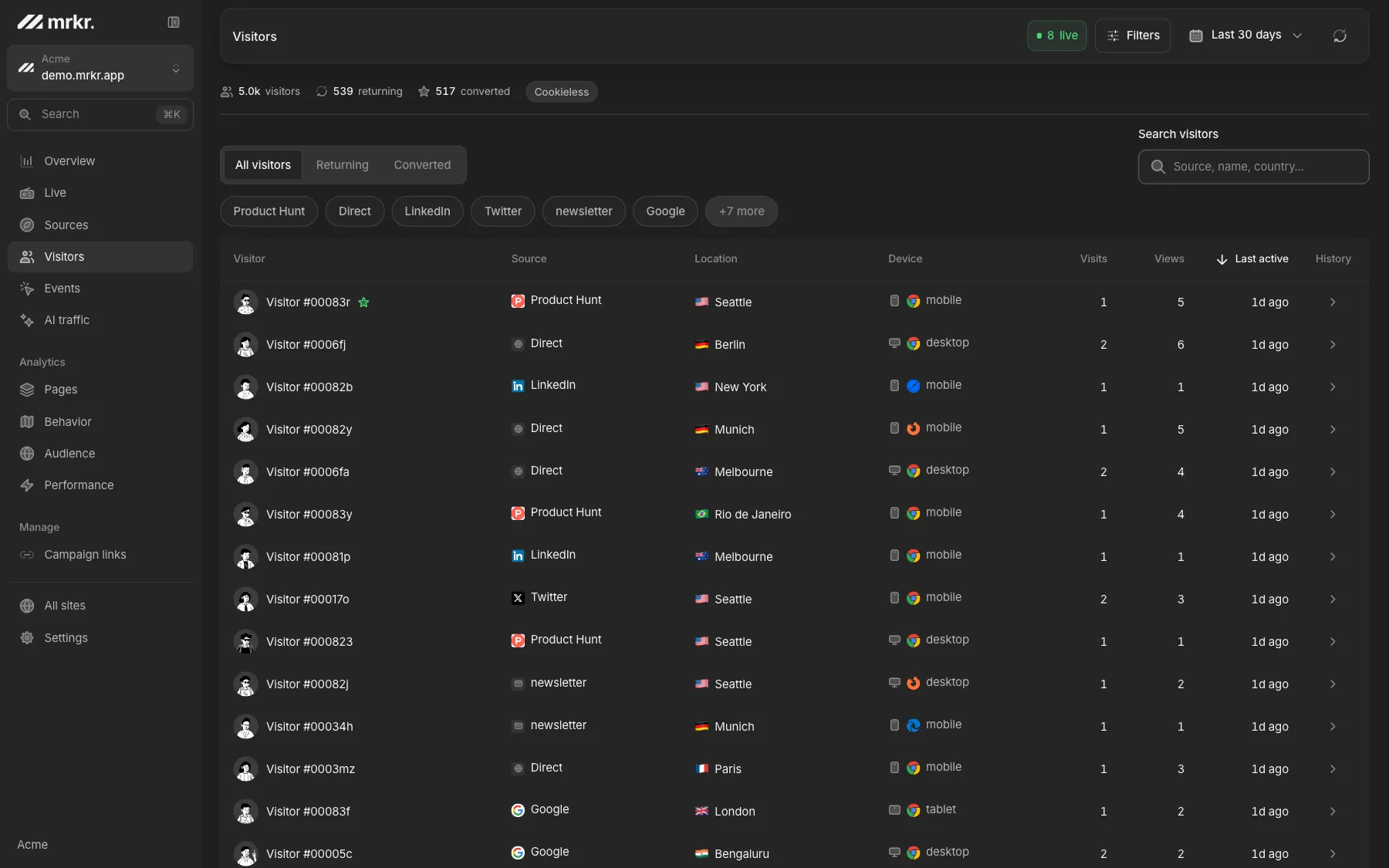
Every visitor, as a list.
Each row is one visitor in the selected range: when they were first and last seen, how many sessions and pageviews they accumulated, and whether they ever completed a conversion. The list loads a hundred at a time, most recently active first.
In the default cookieless mode a visitor shows as a short handle rather than a name, because a stable-looking name would imply a long-term identity that does not exist. In cookie mode they get a consistent, deterministic handle instead, so the same person reads the same every time you look.
Open a row and the visit becomes a timeline: pageviews, outbound clicks, downloads and custom events in order, with source details and a link straight into the replay.
What visitor tracking is actually good for.
Explaining an average
Aggregates tell you where to look. Ten timelines that all stall on the same field tell you what you are looking at.
Reproducing a support ticket
Open the visitor, read the sequence, watch the recording. Browser, viewport and event order are all there.
Checking a launch honestly
The first fifty journeys through a new page say more in ten minutes than a week of waiting for significance.
Understanding each visit
Follow pageviews and tracked events in order, see where the visitor arrived from, and open a recording for context.
Compared
Two different things called visitor tracking.
Person-level identification
- Resolves an IP address to a company, or a form fill to a named individual.
- Persists an identifier for months so one browser can be followed indefinitely.
- Enriches visits with third-party contact data bought from a data broker.
- mrkr does none of this, and it is not on the roadmap.
Behaviour-level tracking, what mrkr does
- Identifies a visit by a salted hash of request signals, rotated every day.
- Shows the full journey through the site, in order, with timestamps.
- Ties the visit to its source, campaign, events and revenue.
- Stores no IP address and no name, because it never collects one.
Compared
What each mode can answer. Cookieless is the default because most teams want the banner gone more than they want the longer window. Cookie mode is one switch per site. The honest difference is this.
| Question | Cookieless (default) | Cookie mode |
|---|---|---|
| How many people visited today | Yes | Yes |
| What did this visitor do in this session | Yes | Yes |
| Where did they come from, and on what campaign | Yes | Yes |
| Did they convert on this visit | Yes | Yes |
| Is this the same person who came last week | No, by construction | Yes |
| How many distinct days was this person active | No | Yes |
| Consent banner required for it | No | Yes |
Nothing on this page is legal advice. The reason cookieless needs no banner is that the ePrivacy rule governs storing and reading on a visitor's device, and cookieless mode does neither for measurement.
Live demo
Open a real visitor. The live demo has a populated visitor list with journeys and replays attached. No signup, no card.
Open the live demoThe trade-off, stated plainly. Cookie mode is a per-site setting that gives persistent identity across sessions and weeks, and it means you need consent for that site. mrkr will not pretend the switch is free in either direction.
No identity across days
The salt is thrown away every 24 hours. The same person hashes to a different value tomorrow, and nothing can join the two.
Questions this rules out
No multi-week timelines and no how-many-visits-before-they-buy. That is the direct price of not needing a banner.
No names, in either mode
No enrichment step and no IP-to-company lookup anywhere in the product. Cookie mode adds persistence, never identity.
FAQ
What is website visitor tracking?
Recording what people do on your site: which pages they saw, in what order, where they came from, what they clicked, and whether they converted. It is behaviour measurement at the level of an individual visit, as opposed to totals like monthly pageviews.
Can you track website visitors without cookies?
Yes. Instead of handing the browser an identifier to give back, the visitor is identified by hashing signals the request already carries, IP address, user agent and the site, together with a salt that rotates every day. mrkr does this by default, so no consent banner is required for it.
Does mrkr tell me who my visitors are by name?
No. There is no IP-to-company lookup, no contact enrichment, and no way to see a person's name, employer or email address. mrkr shows what visitors did, never who they are. If identifying companies from IP addresses is what you need, mrkr is the wrong tool.
Can I follow the same visitor across several days?
Only in cookie mode. In the default cookieless mode the identifier is rebuilt from a salt that rotates every 24 hours, so the same person is a different visitor tomorrow, by construction. Cookie mode is a per-site switch that gives you persistent identity, and then you do need a consent banner for that site.
Is visitor tracking legal under GDPR?
Measuring behaviour is not the thing the ePrivacy rule regulates. Storing or reading something on the visitor's device is. Cookieless tracking has nothing to store, and a daily-rotating salted hash that cannot be reversed or linked across days is generally treated as not identifying a person. This is not legal advice, and your DPO should confirm it for your setup.
What can I actually see for one visitor?
First and last seen, total sessions and pageviews, whether they converted, a timeline of every session mixing pageviews, clicks and custom events in order, and a link into the session recording where one exists.
Start with one line of HTML.Your first visitors show up within a minute.