The UTM builder. Tagged campaign URLs that report cleanly. Presets, live validation, CSV export, and nothing you type leaves this page.
Saved links
Nothing saved yet. Saved links stay in this browser only. They are never uploaded, and there is no account to make.
Everything on this page runs in your browser. No link you build is sent to mrkr, there is nothing to sign up for, and the saved list is stored only in this browser’s local storage.
In short
What is a UTM builder?
A UTM builder appends utm_source, utm_medium and utm_campaign to a URL so your analytics tool can tell where a visit came from. Paste your destination page, name the source, medium and campaign, and you get a correctly encoded link. Without the tags, most paid and email clicks report as direct traffic.
Compared
What each parameter means. Six parameters exist. Three of them do almost all the work. The rest earn their place only when you have a concrete report in mind that needs them.
| Parameter | What it answers | Example | Use it? |
|---|---|---|---|
| utm_source | Which specific site, app or list sent the click | google | Always |
| utm_medium | What type of traffic it is, so channel grouping can bucket it | cpc | Always |
| utm_campaign | Which campaign or push this link belongs to | spring_sale_2026 | Always |
| utm_id | The ad platform's own campaign id, for joining spend to sessions | 1234567890 | When you reconcile ad spend |
| utm_term | The paid keyword that triggered the ad | privacy_analytics | Search ads only |
| utm_content | Which creative, placement or link inside the same campaign | hero_cta | When you are A/B testing creative |
Medium values matter more than they look: analytics tools use them to build channel groupings. cpc, organic, email, referral, affiliate, paid_social and display are the values that get bucketed correctly. Invented ones like ads or fb-paid land in an other bucket.
Where these tags land.
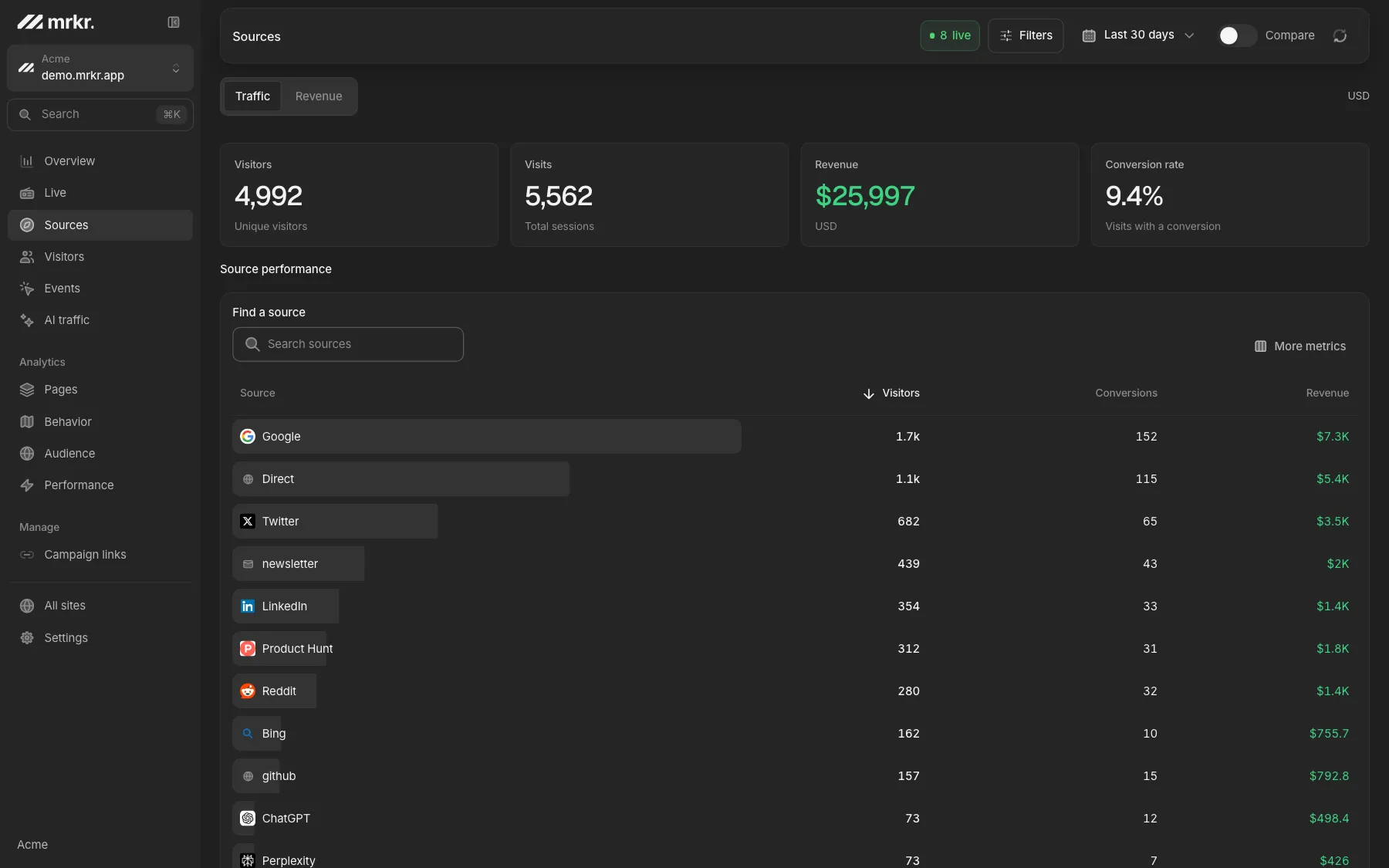
Once a tagged visitor arrives, the parameters show up in your campaign report. In mrkr that is the sources view: source, medium and campaign each get their own breakdown, alongside referrers and direct traffic, so you can see whether the newsletter or the ad actually moved anything.
The tags are read from the URL on arrival. mrkr runs cookieless by default, so nothing persistent is stored on the visitor’s device to make that work. Cookie mode is available per site when you need to follow someone across sessions, and that does change your consent obligations.
Naming rules that keep reports readable.
Lowercase everything
UTM values are case sensitive. Facebook and facebook are two rows that never add back together.
Underscores, not spaces
A space becomes %20, which survives nothing. Underscores survive chat apps and spreadsheets.
Source is the platform
google, linkedin, mailchimp. Campaign carries the what, source carries the where.
Date the campaign
spring_sale_2026 still reads a year later. Dating every link just fragments the campaign.
Why campaigns report wrong.
Mixed case
One person tags LinkedIn, the rest tag linkedin. Both appear, neither is the total.
Tagged internal links
A tagged banner on your own site restarts the session and overwrites the real source. Use an event instead.
One campaign, three spellings
spring-sale, spring_sale and springsale are three campaigns. A shared naming sheet is the only fix.
Redirects that strip the query
Shorteners and vanity domains drop parameters. Click your own link end to end before you send it.
Live demo
Tagged links are only half the job. Building the link is easy. The useful part is seeing which campaign produced revenue, not just clicks. The mrkr demo is a fully populated dashboard on real demo traffic, with no signup.
Open the live demoDo I still need UTM tags in 2026?
More than before, and for a reason that has nothing to do with ads. Referrer data keeps getting thinner. Clicks from apps, from private browsing, from pages that strip the referrer, and increasingly from AI assistants that pass along a bare link, all arrive with no referrer at all and get filed as direct. A UTM parameter survives all of that, because it is part of the URL rather than a header the browser may or may not send.
The trade-off is that the tags are visible to anyone in the address bar. Keep them descriptive rather than clever, and never put anything in a UTM parameter you would not want a visitor to read: no email addresses, no user ids, no unannounced codenames. Personal data in a query string is personal data you are processing, and it lands in server logs everywhere along the way.
FAQ
What is a UTM builder?
A UTM builder is a form that appends utm_source, utm_medium, utm_campaign and the optional utm_term, utm_content and utm_id parameters to a URL, encoding them correctly. Analytics tools read those parameters on arrival and file the visit under the campaign you named instead of lumping it into direct or referral traffic.
Which UTM parameters are required?
Only utm_source, utm_medium and utm_campaign do real work. Source says where the click came from, medium says what kind of traffic it is, campaign says what you were running. utm_term, utm_content and utm_id are optional and only worth adding when you actually plan to report on them.
Are UTM parameters case sensitive?
Yes, in every major analytics tool. Email, EMAIL and email become three separate rows in the same report. That is the single most common way campaign reporting gets quietly ruined, which is why this builder lowercases values by default.
Should I put UTM tags on links between pages of my own site?
No. Tagging an internal link starts a new session and overwrites the original source, so a visitor who found you through Google Ads gets rebranded as newsletter traffic the moment they click your own tagged banner. Use internal link tracking or a custom event instead.
Do UTM parameters need cookies or consent?
The parameters themselves are just text in a URL, not a cookie. Whether you need a consent banner depends on what your analytics tool stores afterwards. mrkr reads UTM parameters and runs cookieless by default, so nothing is written to the visitor's device unless you switch on cookie mode for that site.
Is this UTM builder free, and does it send my links anywhere?
It is free, needs no account, and runs entirely in your browser. The links are built with the URL API on your own machine and never posted to a server. The saved list lives in your browser's local storage, and the CSV export is generated locally too.
Start with one line of HTML.Your first visitors show up within a minute.